Humanizer skill
Rewrites AI-sounding text so it reads like you, without changing what it says.
A Free skill. Sign-in opens soon.
- By
- Siqi Chen
- Licence
- MIT
- Installs
- 10K
- Works in
- 17 apps
What Humanizer makes
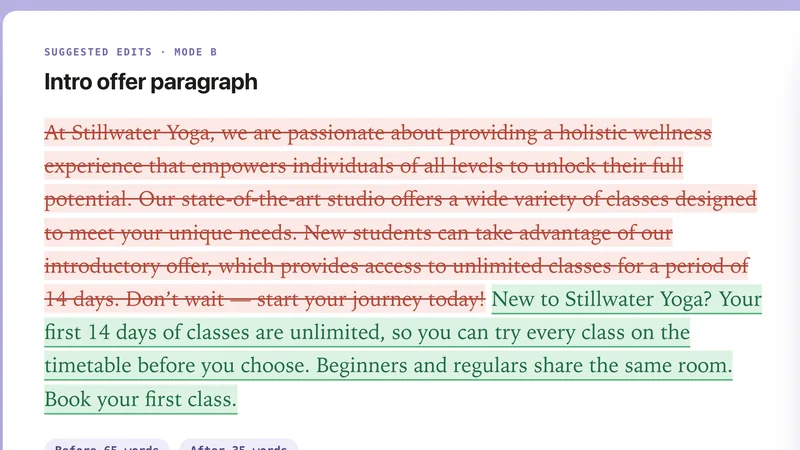
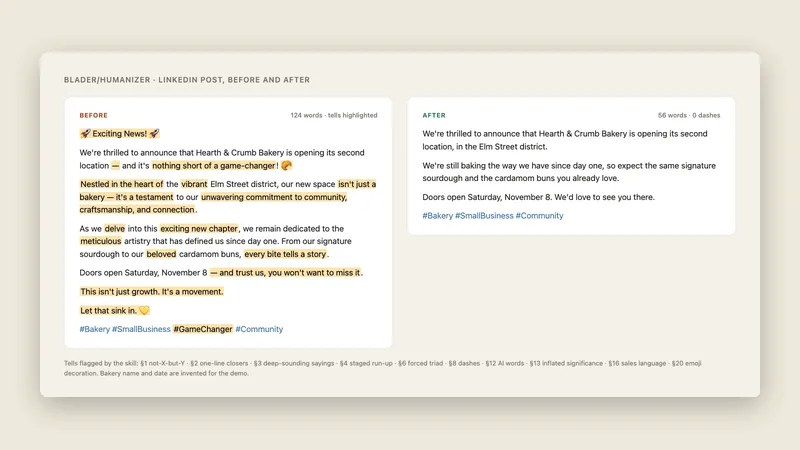
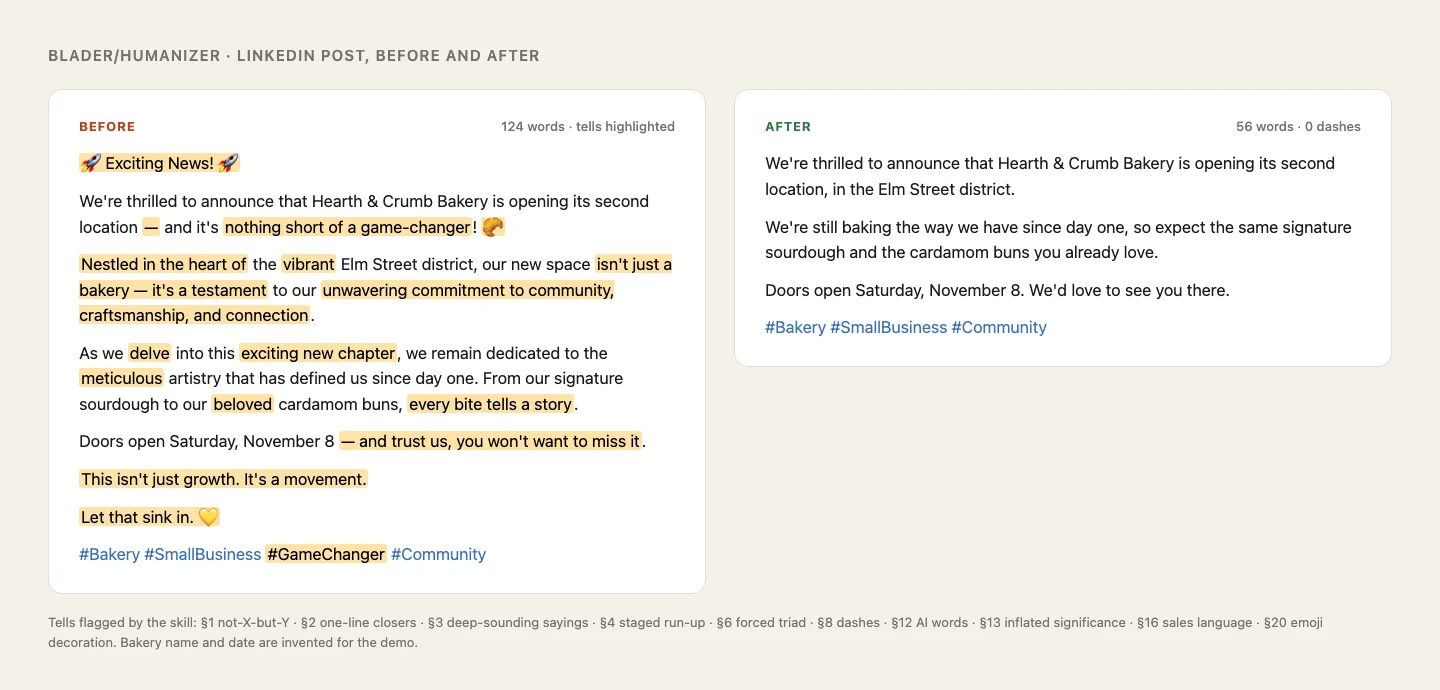
Humanizer edits text that sounds like a chatbot wrote it. It finds the habits that give AI writing away, such as "it's not X, it's Y" contrasts, one-line closers, forced lists of three, dashes everywhere, inflated claims and stock AI words, and rewrites around them. It keeps the facts and does not invent new ones.
It works in four steps: mark the tells, draft a rewrite, check the draft for leftovers, then write the final version. If you give it a sample of your own writing, it matches your sentence length, word choices and punctuation. It is based on Wikipedia's guide to the signs of AI writing.
Best for: Anyone whose drafts come from AI and need to sound like a real person.
- Patterns ranked from strongest to weakest
- Matches your voice if you paste a writing sample
- Never adds facts, names, numbers or quotes
- Can edit a file, changing prose only
- Returns the draft, remaining issues and a final version
Made with this skill
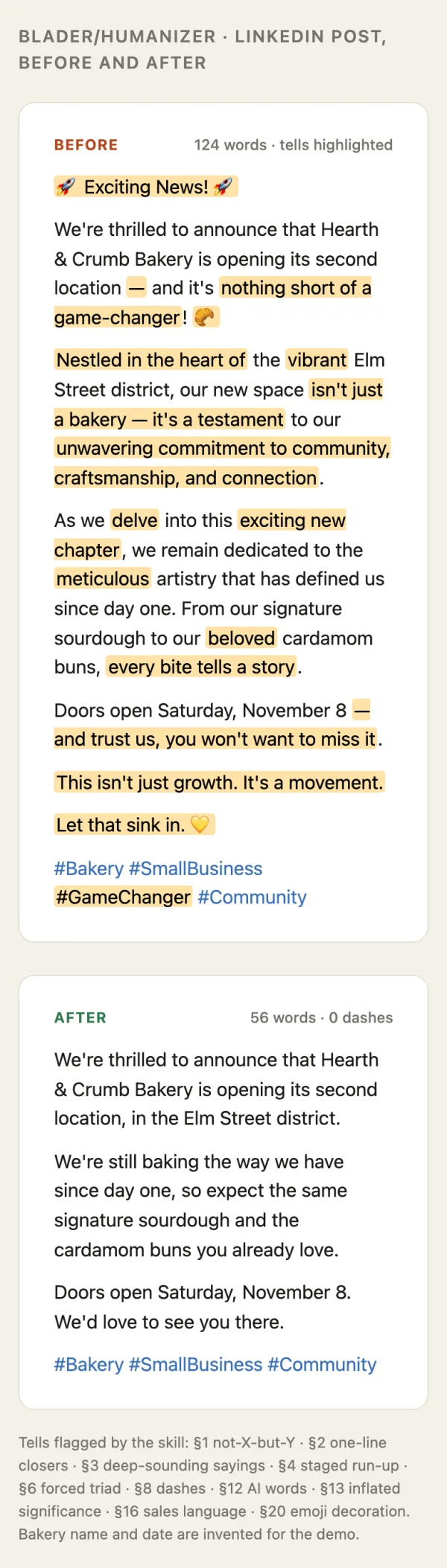
Bakery second-location LinkedIn post, humanized. Write a deliberately AI-sounding 120-word LinkedIn post announcing a bakery opening a second location (full of "delve", "game-changer", em dashes), then run the skill on it. Show before and after. Any brands, names or numbers inside are invented examples.
Example prompts
Type something like this once the skill is added. Your app opens the skill when the request matches.
-
Humanize this LinkedIn post, keep all the facts: [paste post]
-
Here is a sample of my writing. Rewrite this email so it sounds like me.
-
Edit blog-post.md to remove AI tells but leave the code blocks alone.
-
Why does this paragraph sound like AI? Fix it.
What’s inside
14 files in the skill folder, with its MIT licence kept inside. 1 is a program file your agent can run. Read them before you install.
- SKILL.md the instructions
- .claude-plugin/ 2 files
- .cursor-plugin/ 1 files
- .github/ 4 files
- agents/ 1 files
- scripts/ 1 files
- AGENTS.md
- CHANGELOG.md
- LICENSE licence
- README.md
Which apps it works in
A skill is a folder of plain files, so any app that reads the open skills format can use it. Pick your app for its page.
How to add Humanizer to your app
Step by step for each app. We say where to click, so you never need to leave this page.
ChatGPTby OpenAI
- 1 Download the skill (.zip) with the button at the top of this page, then unzip it.
- 2 Open the ChatGPT desktop app and look for Skills in the sidebar, where standalone skills are listed.
- 3 Add the “humanizer” folder there if your version offers it. If you do not see Skills yet, use this skill in Claude or Codex instead.
- 4 In a chat, type @ and pick the skill, or just ask. Ask for what you want, for example: “Humanize this LinkedIn post, keep all the facts: [paste post]”
To make your own, describe the workflow to @skill-creator in ChatGPT Work and it drafts a skill for you.
Claude appby Anthropic
- 1 Download the skill (.zip) with the button at the top of this page.
- 2 In the Claude app, open Settings > Features.
- 3 Upload the .zip file.
- 4 Ask for what you want, for example: “Humanize this LinkedIn post, keep all the facts: [paste post]”
The current Claude Help Center lists Free, Pro, Max, Team and Enterprise. Organization policy can restrict uploads and sharing. Chat runs code in an isolated environment; uploading a skill does not give it your local project, coding-agent tools or unrestricted network access.
Codexby OpenAI
- 1 Download the skill (.zip) with the button at the top of this page, then unzip it.
- 2 Move the “humanizer” folder into your skills folder:
~/.agents/skills - 3 Or paste the install prompt below into Codex and let it do the copying.
- 4 Start a new session. Ask for what you want, for example: “Humanize this LinkedIn post, keep all the facts: [paste post]”
Install prompt: paste this into Codex
I downloaded the agent skill "Humanizer" as humanizer.zip. Unzip it and copy the humanizer folder into ~/.agents/skills. Before you finish, list every file it contains, show me any scripts and what they do, and stop if anything asks for passwords, API keys or downloads from other websites.
To use the skill in one project only, put it in .agents/skills inside that project instead.
Claude Codeby Anthropic
- 1 Download the skill (.zip) with the button at the top of this page, then unzip it.
- 2 Move the “humanizer” folder into your skills folder:
~/.claude/skills - 3 Or paste the install prompt below into Claude Code and let it do the copying.
- 4 Start a new session. Ask for what you want, for example: “Humanize this LinkedIn post, keep all the facts: [paste post]”
Install prompt: paste this into Claude Code
I downloaded the agent skill "Humanizer" as humanizer.zip. Unzip it and copy the humanizer folder into ~/.claude/skills. Before you finish, list every file it contains, show me any scripts and what they do, and stop if anything asks for passwords, API keys or downloads from other websites.
Built-in installer: claude plugin marketplace add <owner/repo>
Built-in installer: claude plugin install <plugin>@<marketplace>
To use the skill in one project only, put it in .claude/skills inside that project instead.
Cursor
- 1 Download the skill (.zip) with the button at the top of this page, then unzip it.
- 2 Move the “humanizer” folder into your skills folder:
~/.cursor/skills - 3 Or paste the install prompt below into Cursor and let it do the copying.
- 4 Start a new session. Ask for what you want, for example: “Humanize this LinkedIn post, keep all the facts: [paste post]”
Install prompt: paste this into Cursor
I downloaded the agent skill "Humanizer" as humanizer.zip. Unzip it and copy the humanizer folder into ~/.cursor/skills. Before you finish, list every file it contains, show me any scripts and what they do, and stop if anything asks for passwords, API keys or downloads from other websites.
To use the skill in one project only, put it in .cursor/skills inside that project instead. Cursor also reads ~/.agents/skills, ~/.claude/skills, ~/.codex/skills.
GitHub Copilotby GitHub
- 1 Download the skill (.zip) with the button at the top of this page, then unzip it.
- 2 Move the “humanizer” folder into your skills folder:
~/.copilot/skills - 3 Or paste the install prompt below into GitHub Copilot and let it do the copying.
- 4 Start a new session. Ask for what you want, for example: “Humanize this LinkedIn post, keep all the facts: [paste post]”
Install prompt: paste this into GitHub Copilot
I downloaded the agent skill "Humanizer" as humanizer.zip. Unzip it and copy the humanizer folder into ~/.copilot/skills. Before you finish, list every file it contains, show me any scripts and what they do, and stop if anything asks for passwords, API keys or downloads from other websites.
Built-in installer: gh skill install <owner/repo> <skill> --agent github-copilot --scope user
To use the skill in one project only, put it in .github/skills inside that project instead. GitHub Copilot also reads ~/.agents/skills.
Gemini CLIby Google
- 1 Download the skill (.zip) with the button at the top of this page, then unzip it.
- 2 Move the “humanizer” folder into your skills folder:
~/.gemini/skills - 3 Or paste the install prompt below into Gemini CLI and let it do the copying.
- 4 Start a new session. Ask for what you want, for example: “Humanize this LinkedIn post, keep all the facts: [paste post]”
Install prompt: paste this into Gemini CLI
I downloaded the agent skill "Humanizer" as humanizer.zip. Unzip it and copy the humanizer folder into ~/.gemini/skills. Before you finish, list every file it contains, show me any scripts and what they do, and stop if anything asks for passwords, API keys or downloads from other websites.
Built-in installer: gemini skills install <git-url>
To use the skill in one project only, put it in .gemini/skills inside that project instead. Gemini CLI also reads ~/.agents/skills.
Windsurf
- 1 Download the skill (.zip) with the button at the top of this page, then unzip it.
- 2 Move the “humanizer” folder into your skills folder:
~/.codeium/windsurf/skills - 3 Or paste the install prompt below into Windsurf and let it do the copying.
- 4 Start a new session. Ask for what you want, for example: “Humanize this LinkedIn post, keep all the facts: [paste post]”
Install prompt: paste this into Windsurf
I downloaded the agent skill "Humanizer" as humanizer.zip. Unzip it and copy the humanizer folder into ~/.codeium/windsurf/skills. Before you finish, list every file it contains, show me any scripts and what they do, and stop if anything asks for passwords, API keys or downloads from other websites.
To use the skill in one project only, put it in .windsurf/skills inside that project instead.
Kiro
- 1 Download the skill (.zip) with the button at the top of this page, then unzip it.
- 2 Move the “humanizer” folder into your skills folder:
~/.kiro/skills - 3 Or paste the install prompt below into Kiro and let it do the copying.
- 4 Start a new session. Ask for what you want, for example: “Humanize this LinkedIn post, keep all the facts: [paste post]”
Install prompt: paste this into Kiro
I downloaded the agent skill "Humanizer" as humanizer.zip. Unzip it and copy the humanizer folder into ~/.kiro/skills. Before you finish, list every file it contains, show me any scripts and what they do, and stop if anything asks for passwords, API keys or downloads from other websites.
To use the skill in one project only, put it in .kiro/skills inside that project instead.
Antigravityby Google
- 1 Download the skill (.zip) with the button at the top of this page, then unzip it.
- 2 Move the “humanizer” folder into your skills folder:
~/.gemini/antigravity/skills - 3 Or paste the install prompt below into Antigravity and let it do the copying.
- 4 Start a new session. Ask for what you want, for example: “Humanize this LinkedIn post, keep all the facts: [paste post]”
Install prompt: paste this into Antigravity
I downloaded the agent skill "Humanizer" as humanizer.zip. Unzip it and copy the humanizer folder into ~/.gemini/antigravity/skills. Before you finish, list every file it contains, show me any scripts and what they do, and stop if anything asks for passwords, API keys or downloads from other websites.
To use the skill in one project only, put it in .agents/skills inside that project instead.
OpenCode
- 1 Download the skill (.zip) with the button at the top of this page, then unzip it.
- 2 Move the “humanizer” folder into your skills folder:
~/.config/opencode/skills - 3 Or paste the install prompt below into OpenCode and let it do the copying.
- 4 Start a new session. Ask for what you want, for example: “Humanize this LinkedIn post, keep all the facts: [paste post]”
Install prompt: paste this into OpenCode
I downloaded the agent skill "Humanizer" as humanizer.zip. Unzip it and copy the humanizer folder into ~/.config/opencode/skills. Before you finish, list every file it contains, show me any scripts and what they do, and stop if anything asks for passwords, API keys or downloads from other websites.
To use the skill in one project only, put it in .opencode/skills inside that project instead. OpenCode also reads ~/.agents/skills, ~/.claude/skills.
Cline
- 1 Download the skill (.zip) with the button at the top of this page, then unzip it.
- 2 Move the “humanizer” folder into your skills folder:
~/.agents/skills - 3 Or paste the install prompt below into Cline and let it do the copying.
- 4 Start a new session. Ask for what you want, for example: “Humanize this LinkedIn post, keep all the facts: [paste post]”
Install prompt: paste this into Cline
I downloaded the agent skill "Humanizer" as humanizer.zip. Unzip it and copy the humanizer folder into ~/.agents/skills. Before you finish, list every file it contains, show me any scripts and what they do, and stop if anything asks for passwords, API keys or downloads from other websites.
To use the skill in one project only, put it in .agents/skills inside that project instead.
Amp
- 1 Download the skill (.zip) with the button at the top of this page, then unzip it.
- 2 Move the “humanizer” folder into your skills folder:
~/.config/agents/skills - 3 Or paste the install prompt below into Amp and let it do the copying.
- 4 Start a new session. Ask for what you want, for example: “Humanize this LinkedIn post, keep all the facts: [paste post]”
Install prompt: paste this into Amp
I downloaded the agent skill "Humanizer" as humanizer.zip. Unzip it and copy the humanizer folder into ~/.config/agents/skills. Before you finish, list every file it contains, show me any scripts and what they do, and stop if anything asks for passwords, API keys or downloads from other websites.
Built-in installer: amp skill add <github-url> --global
To use the skill in one project only, put it in .agents/skills inside that project instead. Amp also reads ~/.agents/skills, ~/.config/amp/skills, ~/.claude/skills.
Gooseby Block
- 1 Download the skill (.zip) with the button at the top of this page, then unzip it.
- 2 Move the “humanizer” folder into your skills folder:
~/.agents/skills - 3 Or paste the install prompt below into Goose and let it do the copying.
- 4 Start a new session. Ask for what you want, for example: “Humanize this LinkedIn post, keep all the facts: [paste post]”
Install prompt: paste this into Goose
I downloaded the agent skill "Humanizer" as humanizer.zip. Unzip it and copy the humanizer folder into ~/.agents/skills. Before you finish, list every file it contains, show me any scripts and what they do, and stop if anything asks for passwords, API keys or downloads from other websites.
To use the skill in one project only, put it in .agents/skills inside that project instead. Goose also reads ~/.claude/skills.
OpenClaw
- 1 Download the skill (.zip) with the button at the top of this page, then unzip it.
- 2 Move the “humanizer” folder into your skills folder:
~/.openclaw/skills - 3 Or paste the install prompt below into OpenClaw and let it do the copying.
- 4 Start a new session. Ask for what you want, for example: “Humanize this LinkedIn post, keep all the facts: [paste post]”
Install prompt: paste this into OpenClaw
I downloaded the agent skill "Humanizer" as humanizer.zip. Unzip it and copy the humanizer folder into ~/.openclaw/skills. Before you finish, list every file it contains, show me any scripts and what they do, and stop if anything asks for passwords, API keys or downloads from other websites.
Built-in installer: openclaw skills install @owner/<slug>
Built-in installer: openclaw skills install @owner/<slug> --global
Built-in installer: openclaw skills install git:owner/repo@ref
To use the skill in one project only, put it in skills inside that project instead. OpenClaw also reads ~/.agents/skills.
Hermes Agentby Nous Research
- 1 Download the skill (.zip) with the button at the top of this page, then unzip it.
- 2 Move the “humanizer” folder into your skills folder:
~/.hermes/skills - 3 Or paste the install prompt below into Hermes Agent and let it do the copying.
- 4 Start a new session. Ask for what you want, for example: “Humanize this LinkedIn post, keep all the facts: [paste post]”
Install prompt: paste this into Hermes Agent
I downloaded the agent skill "Humanizer" as humanizer.zip. Unzip it and copy the humanizer folder into ~/.hermes/skills. Before you finish, list every file it contains, show me any scripts and what they do, and stop if anything asks for passwords, API keys or downloads from other websites.
Built-in installer: hermes skills install <owner/repo/skill>
VS Codeby Microsoft
- 1 Download the skill (.zip) with the button at the top of this page, then unzip it.
- 2 Move the “humanizer” folder into your skills folder:
~/.copilot/skills - 3 Or paste the install prompt below into VS Code and let it do the copying.
- 4 Start a new session. Ask for what you want, for example: “Humanize this LinkedIn post, keep all the facts: [paste post]”
Install prompt: paste this into VS Code
I downloaded the agent skill "Humanizer" as humanizer.zip. Unzip it and copy the humanizer folder into ~/.copilot/skills. Before you finish, list every file it contains, show me any scripts and what they do, and stop if anything asks for passwords, API keys or downloads from other websites.
To use the skill in one project only, put it in .github/skills inside that project instead. VS Code also reads ~/.claude/skills, ~/.agents/skills.
This skill includes 1 program file. That is normal for skills that build real files, but read them first, and stop if anything asks for passwords or outside downloads.
Questions about Humanizer
Will it make up details?
No. It is told not to add any fact, name, number, date or quote that is not in your text or from you.
Does it shorten my text?
Often, yes. It cuts inflation instead of swapping it. In our test, a 124-word post became 56 words.
Was this skill tested?
We wrote a deliberately AI-sounding post for a made-up bakery opening a second location and ran the skill on it. It flagged the tells and returned a much shorter, plainer post with no new facts. The bakery and details were invented.
Is the Humanizer skill free?
Yes. It is a Free skill on Best Agent Skills. Sign-in opens soon; when it does, a free account is all you need to download it.
Who made the Humanizer skill?
Siqi Chen. We did not write it. Best Agent Skills curates skills like this one, explains them in plain words and shows how to add them to your app. It is shared under the MIT licence (Copyright (c) 2025 Siqi Chen).