Mermaid Diagrams skill
Turn text into clean flowcharts, mind maps and sequence diagrams that render in Obsidian and elsewhere.
A Free skill. Sign-in opens soon.
- By
- Axton Liu
- Licence
- MIT
- Works in
- 17 apps
What Mermaid Diagrams makes
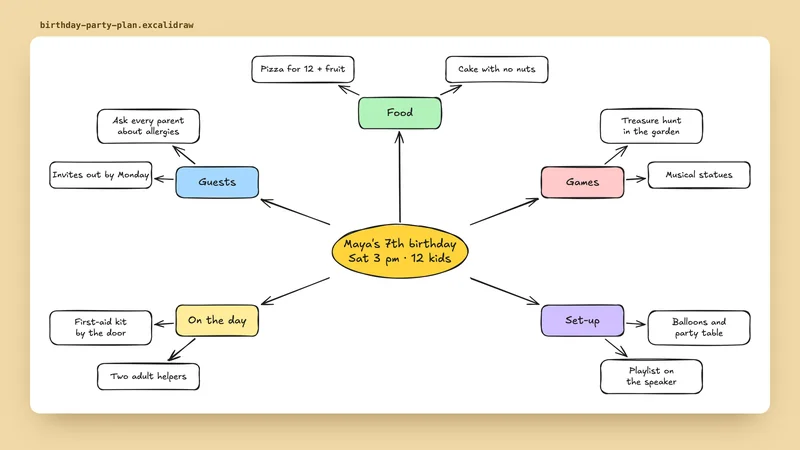
Mermaid is a simple text format for drawing diagrams. This skill turns your description into correct Mermaid code for flowcharts, circular flows, comparisons, mind maps, sequence diagrams and state diagrams, with sensible colours and layout.
It knows common mistakes that break diagrams, such as list-style text and odd subgraph names, and avoids them so the diagram shows up on the first try. We picked it because it is MIT licensed and focused on readable diagrams. It comes from a pack for Obsidian but works anywhere Mermaid does.
Best for: Anyone who wants a quick, clean diagram from a description, with no drawing tool.
- Six diagram types: process flow, circular flow, comparison, mind map, sequence and state.
- Vertical layout and medium detail by default, changeable on request.
- Built in rules to avoid syntax that breaks diagrams.
- Semantic colour defaults.
Made with this skill
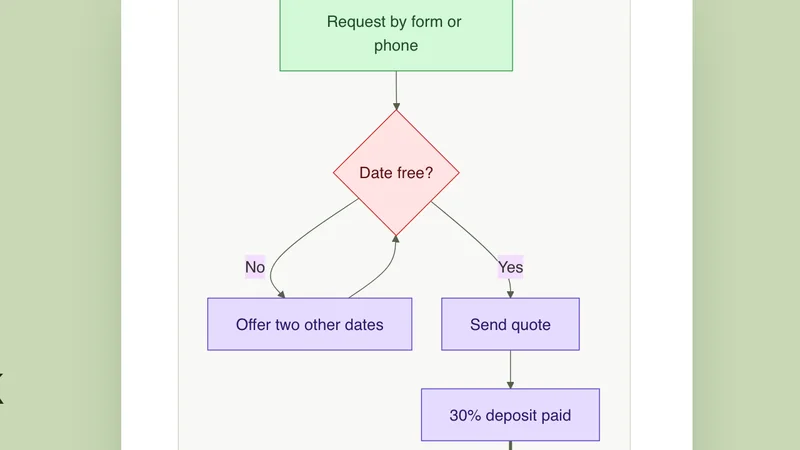
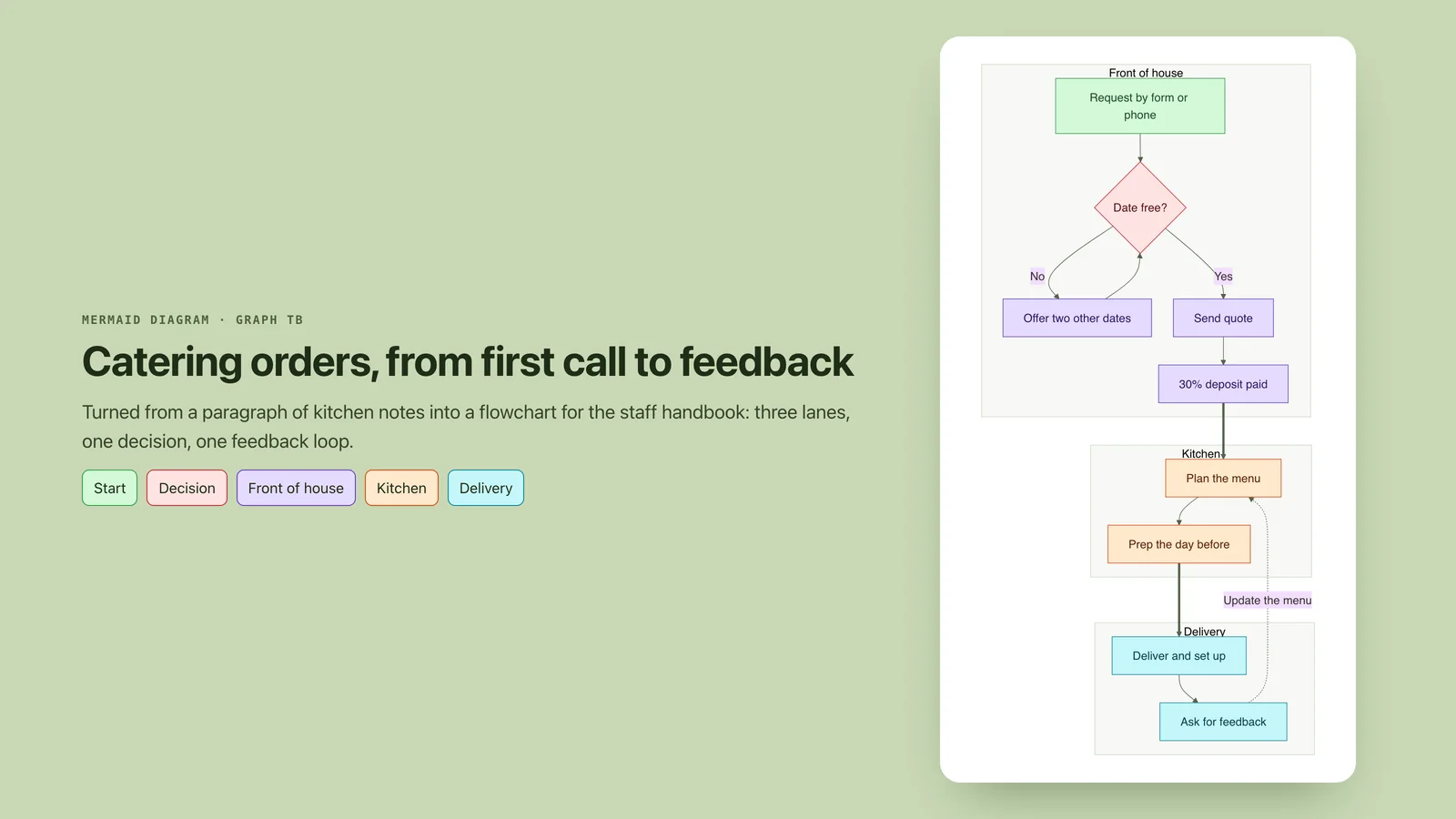
A catering order flowchart for a staff handbook. Turn a paragraph of kitchen notes about catering orders into a diagram for the staff handbook. Any brands, names or numbers inside are invented examples.
Example prompts
Type something like this once the skill is added. Your app opens the skill when the request matches.
-
Draw a flowchart of how a customer order moves from checkout to delivery.
-
Make a mind map of the main parts of my business plan.
-
Show the steps of our sign up process as a sequence diagram.
What’s inside
3 files in the skill folder, with its MIT licence kept inside. Only text instructions and reference files, no program files.
- SKILL.md the instructions
- references/ 1 files
- LICENSE licence
Which apps it works in
A skill is a folder of plain files, so any app that reads the open skills format can use it. Pick your app for its page.
How to add Mermaid Diagrams to your app
Step by step for each app. We say where to click, so you never need to leave this page.
ChatGPTby OpenAI
- 1 Download the skill (.zip) with the button at the top of this page, then unzip it.
- 2 Open the ChatGPT desktop app and look for Skills in the sidebar, where standalone skills are listed.
- 3 Add the “mermaid” folder there if your version offers it. If you do not see Skills yet, use this skill in Claude or Codex instead.
- 4 In a chat, type @ and pick the skill, or just ask. Ask for what you want, for example: “Draw a flowchart of how a customer order moves from checkout to delivery.”
To make your own, describe the workflow to @skill-creator in ChatGPT Work and it drafts a skill for you.
Claude appby Anthropic
- 1 Download the skill (.zip) with the button at the top of this page.
- 2 In the Claude app, open Settings > Features.
- 3 Upload the .zip file.
- 4 Ask for what you want, for example: “Draw a flowchart of how a customer order moves from checkout to delivery.”
The current Claude Help Center lists Free, Pro, Max, Team and Enterprise. Organization policy can restrict uploads and sharing. Chat runs code in an isolated environment; uploading a skill does not give it your local project, coding-agent tools or unrestricted network access.
Codexby OpenAI
- 1 Download the skill (.zip) with the button at the top of this page, then unzip it.
- 2 Move the “mermaid” folder into your skills folder:
~/.agents/skills - 3 Or paste the install prompt below into Codex and let it do the copying.
- 4 Start a new session. Ask for what you want, for example: “Draw a flowchart of how a customer order moves from checkout to delivery.”
Install prompt: paste this into Codex
I downloaded the agent skill "Mermaid Diagrams" as mermaid.zip. Unzip it and copy the mermaid folder into ~/.agents/skills. Before you finish, list every file it contains, show me any scripts and what they do, and stop if anything asks for passwords, API keys or downloads from other websites.
To use the skill in one project only, put it in .agents/skills inside that project instead.
Claude Codeby Anthropic
- 1 Download the skill (.zip) with the button at the top of this page, then unzip it.
- 2 Move the “mermaid” folder into your skills folder:
~/.claude/skills - 3 Or paste the install prompt below into Claude Code and let it do the copying.
- 4 Start a new session. Ask for what you want, for example: “Draw a flowchart of how a customer order moves from checkout to delivery.”
Install prompt: paste this into Claude Code
I downloaded the agent skill "Mermaid Diagrams" as mermaid.zip. Unzip it and copy the mermaid folder into ~/.claude/skills. Before you finish, list every file it contains, show me any scripts and what they do, and stop if anything asks for passwords, API keys or downloads from other websites.
Built-in installer: claude plugin marketplace add <owner/repo>
Built-in installer: claude plugin install <plugin>@<marketplace>
To use the skill in one project only, put it in .claude/skills inside that project instead.
Cursor
- 1 Download the skill (.zip) with the button at the top of this page, then unzip it.
- 2 Move the “mermaid” folder into your skills folder:
~/.cursor/skills - 3 Or paste the install prompt below into Cursor and let it do the copying.
- 4 Start a new session. Ask for what you want, for example: “Draw a flowchart of how a customer order moves from checkout to delivery.”
Install prompt: paste this into Cursor
I downloaded the agent skill "Mermaid Diagrams" as mermaid.zip. Unzip it and copy the mermaid folder into ~/.cursor/skills. Before you finish, list every file it contains, show me any scripts and what they do, and stop if anything asks for passwords, API keys or downloads from other websites.
To use the skill in one project only, put it in .cursor/skills inside that project instead. Cursor also reads ~/.agents/skills, ~/.claude/skills, ~/.codex/skills.
GitHub Copilotby GitHub
- 1 Download the skill (.zip) with the button at the top of this page, then unzip it.
- 2 Move the “mermaid” folder into your skills folder:
~/.copilot/skills - 3 Or paste the install prompt below into GitHub Copilot and let it do the copying.
- 4 Start a new session. Ask for what you want, for example: “Draw a flowchart of how a customer order moves from checkout to delivery.”
Install prompt: paste this into GitHub Copilot
I downloaded the agent skill "Mermaid Diagrams" as mermaid.zip. Unzip it and copy the mermaid folder into ~/.copilot/skills. Before you finish, list every file it contains, show me any scripts and what they do, and stop if anything asks for passwords, API keys or downloads from other websites.
Built-in installer: gh skill install <owner/repo> <skill> --agent github-copilot --scope user
To use the skill in one project only, put it in .github/skills inside that project instead. GitHub Copilot also reads ~/.agents/skills.
Gemini CLIby Google
- 1 Download the skill (.zip) with the button at the top of this page, then unzip it.
- 2 Move the “mermaid” folder into your skills folder:
~/.gemini/skills - 3 Or paste the install prompt below into Gemini CLI and let it do the copying.
- 4 Start a new session. Ask for what you want, for example: “Draw a flowchart of how a customer order moves from checkout to delivery.”
Install prompt: paste this into Gemini CLI
I downloaded the agent skill "Mermaid Diagrams" as mermaid.zip. Unzip it and copy the mermaid folder into ~/.gemini/skills. Before you finish, list every file it contains, show me any scripts and what they do, and stop if anything asks for passwords, API keys or downloads from other websites.
Built-in installer: gemini skills install <git-url>
To use the skill in one project only, put it in .gemini/skills inside that project instead. Gemini CLI also reads ~/.agents/skills.
Windsurf
- 1 Download the skill (.zip) with the button at the top of this page, then unzip it.
- 2 Move the “mermaid” folder into your skills folder:
~/.codeium/windsurf/skills - 3 Or paste the install prompt below into Windsurf and let it do the copying.
- 4 Start a new session. Ask for what you want, for example: “Draw a flowchart of how a customer order moves from checkout to delivery.”
Install prompt: paste this into Windsurf
I downloaded the agent skill "Mermaid Diagrams" as mermaid.zip. Unzip it and copy the mermaid folder into ~/.codeium/windsurf/skills. Before you finish, list every file it contains, show me any scripts and what they do, and stop if anything asks for passwords, API keys or downloads from other websites.
To use the skill in one project only, put it in .windsurf/skills inside that project instead.
Kiro
- 1 Download the skill (.zip) with the button at the top of this page, then unzip it.
- 2 Move the “mermaid” folder into your skills folder:
~/.kiro/skills - 3 Or paste the install prompt below into Kiro and let it do the copying.
- 4 Start a new session. Ask for what you want, for example: “Draw a flowchart of how a customer order moves from checkout to delivery.”
Install prompt: paste this into Kiro
I downloaded the agent skill "Mermaid Diagrams" as mermaid.zip. Unzip it and copy the mermaid folder into ~/.kiro/skills. Before you finish, list every file it contains, show me any scripts and what they do, and stop if anything asks for passwords, API keys or downloads from other websites.
To use the skill in one project only, put it in .kiro/skills inside that project instead.
Antigravityby Google
- 1 Download the skill (.zip) with the button at the top of this page, then unzip it.
- 2 Move the “mermaid” folder into your skills folder:
~/.gemini/antigravity/skills - 3 Or paste the install prompt below into Antigravity and let it do the copying.
- 4 Start a new session. Ask for what you want, for example: “Draw a flowchart of how a customer order moves from checkout to delivery.”
Install prompt: paste this into Antigravity
I downloaded the agent skill "Mermaid Diagrams" as mermaid.zip. Unzip it and copy the mermaid folder into ~/.gemini/antigravity/skills. Before you finish, list every file it contains, show me any scripts and what they do, and stop if anything asks for passwords, API keys or downloads from other websites.
To use the skill in one project only, put it in .agents/skills inside that project instead.
OpenCode
- 1 Download the skill (.zip) with the button at the top of this page, then unzip it.
- 2 Move the “mermaid” folder into your skills folder:
~/.config/opencode/skills - 3 Or paste the install prompt below into OpenCode and let it do the copying.
- 4 Start a new session. Ask for what you want, for example: “Draw a flowchart of how a customer order moves from checkout to delivery.”
Install prompt: paste this into OpenCode
I downloaded the agent skill "Mermaid Diagrams" as mermaid.zip. Unzip it and copy the mermaid folder into ~/.config/opencode/skills. Before you finish, list every file it contains, show me any scripts and what they do, and stop if anything asks for passwords, API keys or downloads from other websites.
To use the skill in one project only, put it in .opencode/skills inside that project instead. OpenCode also reads ~/.agents/skills, ~/.claude/skills.
Cline
- 1 Download the skill (.zip) with the button at the top of this page, then unzip it.
- 2 Move the “mermaid” folder into your skills folder:
~/.agents/skills - 3 Or paste the install prompt below into Cline and let it do the copying.
- 4 Start a new session. Ask for what you want, for example: “Draw a flowchart of how a customer order moves from checkout to delivery.”
Install prompt: paste this into Cline
I downloaded the agent skill "Mermaid Diagrams" as mermaid.zip. Unzip it and copy the mermaid folder into ~/.agents/skills. Before you finish, list every file it contains, show me any scripts and what they do, and stop if anything asks for passwords, API keys or downloads from other websites.
To use the skill in one project only, put it in .agents/skills inside that project instead.
Amp
- 1 Download the skill (.zip) with the button at the top of this page, then unzip it.
- 2 Move the “mermaid” folder into your skills folder:
~/.config/agents/skills - 3 Or paste the install prompt below into Amp and let it do the copying.
- 4 Start a new session. Ask for what you want, for example: “Draw a flowchart of how a customer order moves from checkout to delivery.”
Install prompt: paste this into Amp
I downloaded the agent skill "Mermaid Diagrams" as mermaid.zip. Unzip it and copy the mermaid folder into ~/.config/agents/skills. Before you finish, list every file it contains, show me any scripts and what they do, and stop if anything asks for passwords, API keys or downloads from other websites.
Built-in installer: amp skill add <github-url> --global
To use the skill in one project only, put it in .agents/skills inside that project instead. Amp also reads ~/.agents/skills, ~/.config/amp/skills, ~/.claude/skills.
Gooseby Block
- 1 Download the skill (.zip) with the button at the top of this page, then unzip it.
- 2 Move the “mermaid” folder into your skills folder:
~/.agents/skills - 3 Or paste the install prompt below into Goose and let it do the copying.
- 4 Start a new session. Ask for what you want, for example: “Draw a flowchart of how a customer order moves from checkout to delivery.”
Install prompt: paste this into Goose
I downloaded the agent skill "Mermaid Diagrams" as mermaid.zip. Unzip it and copy the mermaid folder into ~/.agents/skills. Before you finish, list every file it contains, show me any scripts and what they do, and stop if anything asks for passwords, API keys or downloads from other websites.
To use the skill in one project only, put it in .agents/skills inside that project instead. Goose also reads ~/.claude/skills.
OpenClaw
- 1 Download the skill (.zip) with the button at the top of this page, then unzip it.
- 2 Move the “mermaid” folder into your skills folder:
~/.openclaw/skills - 3 Or paste the install prompt below into OpenClaw and let it do the copying.
- 4 Start a new session. Ask for what you want, for example: “Draw a flowchart of how a customer order moves from checkout to delivery.”
Install prompt: paste this into OpenClaw
I downloaded the agent skill "Mermaid Diagrams" as mermaid.zip. Unzip it and copy the mermaid folder into ~/.openclaw/skills. Before you finish, list every file it contains, show me any scripts and what they do, and stop if anything asks for passwords, API keys or downloads from other websites.
Built-in installer: openclaw skills install @owner/<slug>
Built-in installer: openclaw skills install @owner/<slug> --global
Built-in installer: openclaw skills install git:owner/repo@ref
To use the skill in one project only, put it in skills inside that project instead. OpenClaw also reads ~/.agents/skills.
Hermes Agentby Nous Research
- 1 Download the skill (.zip) with the button at the top of this page, then unzip it.
- 2 Move the “mermaid” folder into your skills folder:
~/.hermes/skills - 3 Or paste the install prompt below into Hermes Agent and let it do the copying.
- 4 Start a new session. Ask for what you want, for example: “Draw a flowchart of how a customer order moves from checkout to delivery.”
Install prompt: paste this into Hermes Agent
I downloaded the agent skill "Mermaid Diagrams" as mermaid.zip. Unzip it and copy the mermaid folder into ~/.hermes/skills. Before you finish, list every file it contains, show me any scripts and what they do, and stop if anything asks for passwords, API keys or downloads from other websites.
Built-in installer: hermes skills install <owner/repo/skill>
VS Codeby Microsoft
- 1 Download the skill (.zip) with the button at the top of this page, then unzip it.
- 2 Move the “mermaid” folder into your skills folder:
~/.copilot/skills - 3 Or paste the install prompt below into VS Code and let it do the copying.
- 4 Start a new session. Ask for what you want, for example: “Draw a flowchart of how a customer order moves from checkout to delivery.”
Install prompt: paste this into VS Code
I downloaded the agent skill "Mermaid Diagrams" as mermaid.zip. Unzip it and copy the mermaid folder into ~/.copilot/skills. Before you finish, list every file it contains, show me any scripts and what they do, and stop if anything asks for passwords, API keys or downloads from other websites.
To use the skill in one project only, put it in .github/skills inside that project instead. VS Code also reads ~/.claude/skills, ~/.agents/skills.
Questions about Mermaid Diagrams
Where can I see the diagram?
Any tool that renders Mermaid, such as Obsidian or GitHub, per the skill's notes.
Licence?
MIT, by Axton Liu. The licence file is included.
Is the Mermaid Diagrams skill free?
Yes. It is a Free skill on Best Agent Skills. Sign-in opens soon; when it does, a free account is all you need to download it.
Who made the Mermaid Diagrams skill?
Axton Liu. We did not write it. Best Agent Skills curates skills like this one, explains them in plain words and shows how to add them to your app. It is shared under the MIT licence (Copyright (c) 2025 Axton Liu).