pstack skills
Lauren Tan's rigorous engineering workflow for coding agents: one entry skill picks a playbook, then the agent designs, delegates, reviews and proves the work.
A Premium skill. Premium opens soon.
- By
- Lauren Tan (poteto), ported by Michael Denyer
- Licence
- MIT
- Works in
- 6 apps
What pstack makes
pstack is an opinionated skill stack for coding agents by Lauren Tan, known as poteto, first made for Cursor. This pick is Michael Denyer's MIT port, which brings it to Claude Code, Codex, GitHub Copilot, OpenCode, Gemini CLI and other apps that read skill folders. The goal it states: concise, simple code and work that is verified before it is called done.
You start with one skill, poteto-mode. Tell it your goal and it picks one of 23 playbooks, such as bug fix, feature, refactoring, investigation, prototype, perf issue or shipping. For a bug, it reproduces the failure, investigates with the how and why skills, delegates the fix and reruns the failing case, then hands back the fix with the failing and passing evidence.
The pack holds 65 skill folders: 41 workflow and review skills, and 24 short principles such as Prove It Works, Fix Root Causes and Subtract Before You Add, which the workflows name when they make a decision. Six skills come from Cursor's team kit and three review skills from Cursor's thermos set. Their licence files travel with the download.
Best for: Developers who let an agent write real code and want it to design first, prove each change and leave a trail they can review.
- poteto-mode: the entry point. Name your goal and it chooses the playbook, the skills and the checks.
- architect: sketches types, signatures and module structure before code, then stays in the loop while the code fills in.
- arena and swarm: run several attempts or workers in parallel, then keep the strongest result or one combined report.
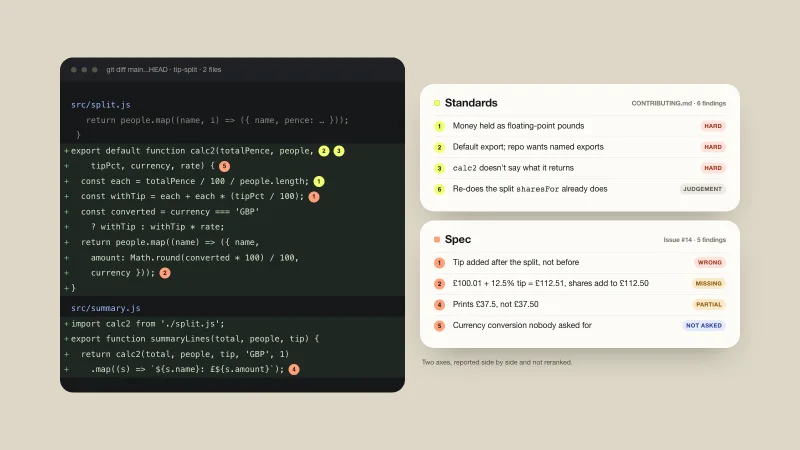
- interrogate: several AI reviewers challenge a change from independent angles before it ships.
- thermos: a strict bug and security audit and a maintainability review, run side by side on a branch.
- unslop and deslop: cut AI tells from writing, and AI-generated slop from code.
- fix-ci, fix-merge-conflicts and babysit: find failing checks, resolve conflicts and drive an open pull request to a mergeable state.
- tdd and create-verification-skill: a failing test first when there is a cheap target, and a project skill that drives your app the way a user does.
Example prompts
Type something like this once the skill is added. Your app opens the skill when the request matches.
-
Use poteto-mode to fix the search filter resetting when I change pages.
-
/architect Sketch the types and modules for a CSV import feature before writing any code.
-
/thermos Audit this branch for bugs, security issues and code quality before I open the pull request.
-
/babysit Watch my open pull request, fix the failing checks and handle the simple review comments.
What’s inside
182 files in this pack, with its MIT licence kept inside. 34 are program files your agent can run. Read them before you install.
- architect/ 4 files
- arena/ 1 files
- automate-me/ 1 files
- babysit/ 1 files
- benchmark-checklist/ 1 files
- blast-radius/ 1 files
- bro/ 1 files
- correct/ 1 files
- create-formal-verification-skill/ 1 files
- create-verification-skill/ 4 files
- deslop/ 1 files
- figure-it-out/ 1 files
- fix-ci/ 1 files
- fix-merge-conflicts/ 1 files
- and 56 more
Skills in this pack
- architect
- arena
- automate-me
- babysit
- benchmark-checklist
- blast-radius
- bro
- correct
- create-formal-verification-skill
- create-verification-skill
- deslop
- figure-it-out
- fix-ci
- fix-merge-conflicts
- get-pr-comments
- how
- in-your-own-words
- interrogate
- ketchup
- maintain-formal-verification-skill
- maintain-verification-skill
- make-pr-easy-to-review
- no-comments
- poteto-help
- poteto-mode
- principle-attack-the-premise
- principle-boundary-discipline
- principle-build-the-lever
- principle-encode-lessons-in-structure
- principle-exhaust-the-design-space
- principle-experience-first
- principle-explain-the-number
- principle-fix-root-causes
- principle-foundational-thinking
- principle-guard-the-context-window
- principle-laziness-protocol
- principle-make-operations-idempotent
- principle-migrate-callers-then-delete-legacy-apis
- principle-minimize-reader-load
- principle-model-the-domain
Showing 40 of 65 skills. Pick the few you need.
Which apps it works in
A skill is a folder of plain files, so any app that reads the open skills format can use it. Pick your app for its page.
How to add pstack to your app
Step by step for each app. We say where to click, so you never need to leave this page.
Codexby OpenAI
- 1 Download the skill (.zip) with the button at the top of this page, then unzip it.
- 2 Move the folders inside into your skills folder:
~/.agents/skills - 3 Or paste the install prompt below into Codex and let it do the copying.
- 4 Start a new session. Ask for what you want, for example: “Use poteto-mode to fix the search filter resetting when I change pages.”
Install prompt: paste this into Codex
I downloaded the agent skill "pstack" as pstack.zip. Unzip it and copy the folders inside into ~/.agents/skills. Before you finish, list every file it contains, show me any scripts and what they do, and stop if anything asks for passwords, API keys or downloads from other websites.
To use the skill in one project only, put it in .agents/skills inside that project instead.
Claude Codeby Anthropic
- 1 Download the skill (.zip) with the button at the top of this page, then unzip it.
- 2 Move the folders inside into your skills folder:
~/.claude/skills - 3 Or paste the install prompt below into Claude Code and let it do the copying.
- 4 Start a new session. Ask for what you want, for example: “Use poteto-mode to fix the search filter resetting when I change pages.”
Install prompt: paste this into Claude Code
I downloaded the agent skill "pstack" as pstack.zip. Unzip it and copy the folders inside into ~/.claude/skills. Before you finish, list every file it contains, show me any scripts and what they do, and stop if anything asks for passwords, API keys or downloads from other websites.
Built-in installer: claude plugin marketplace add <owner/repo>
Built-in installer: claude plugin install <plugin>@<marketplace>
To use the skill in one project only, put it in .claude/skills inside that project instead.
Cursor
- 1 Download the skill (.zip) with the button at the top of this page, then unzip it.
- 2 Move the folders inside into your skills folder:
~/.cursor/skills - 3 Or paste the install prompt below into Cursor and let it do the copying.
- 4 Start a new session. Ask for what you want, for example: “Use poteto-mode to fix the search filter resetting when I change pages.”
Install prompt: paste this into Cursor
I downloaded the agent skill "pstack" as pstack.zip. Unzip it and copy the folders inside into ~/.cursor/skills. Before you finish, list every file it contains, show me any scripts and what they do, and stop if anything asks for passwords, API keys or downloads from other websites.
To use the skill in one project only, put it in .cursor/skills inside that project instead. Cursor also reads ~/.agents/skills, ~/.claude/skills, ~/.codex/skills.
GitHub Copilotby GitHub
- 1 Download the skill (.zip) with the button at the top of this page, then unzip it.
- 2 Move the folders inside into your skills folder:
~/.copilot/skills - 3 Or paste the install prompt below into GitHub Copilot and let it do the copying.
- 4 Start a new session. Ask for what you want, for example: “Use poteto-mode to fix the search filter resetting when I change pages.”
Install prompt: paste this into GitHub Copilot
I downloaded the agent skill "pstack" as pstack.zip. Unzip it and copy the folders inside into ~/.copilot/skills. Before you finish, list every file it contains, show me any scripts and what they do, and stop if anything asks for passwords, API keys or downloads from other websites.
Built-in installer: gh skill install <owner/repo> <skill> --agent github-copilot --scope user
To use the skill in one project only, put it in .github/skills inside that project instead. GitHub Copilot also reads ~/.agents/skills.
Gemini CLIby Google
- 1 Download the skill (.zip) with the button at the top of this page, then unzip it.
- 2 Move the folders inside into your skills folder:
~/.gemini/skills - 3 Or paste the install prompt below into Gemini CLI and let it do the copying.
- 4 Start a new session. Ask for what you want, for example: “Use poteto-mode to fix the search filter resetting when I change pages.”
Install prompt: paste this into Gemini CLI
I downloaded the agent skill "pstack" as pstack.zip. Unzip it and copy the folders inside into ~/.gemini/skills. Before you finish, list every file it contains, show me any scripts and what they do, and stop if anything asks for passwords, API keys or downloads from other websites.
Built-in installer: gemini skills install <git-url>
To use the skill in one project only, put it in .gemini/skills inside that project instead. Gemini CLI also reads ~/.agents/skills.
OpenCode
- 1 Download the skill (.zip) with the button at the top of this page, then unzip it.
- 2 Move the folders inside into your skills folder:
~/.config/opencode/skills - 3 Or paste the install prompt below into OpenCode and let it do the copying.
- 4 Start a new session. Ask for what you want, for example: “Use poteto-mode to fix the search filter resetting when I change pages.”
Install prompt: paste this into OpenCode
I downloaded the agent skill "pstack" as pstack.zip. Unzip it and copy the folders inside into ~/.config/opencode/skills. Before you finish, list every file it contains, show me any scripts and what they do, and stop if anything asks for passwords, API keys or downloads from other websites.
To use the skill in one project only, put it in .opencode/skills inside that project instead. OpenCode also reads ~/.agents/skills, ~/.claude/skills.
This skill includes 34 program files. That is normal for skills that build real files, but read them first, and stop if anything asks for passwords or outside downloads.
Questions about pstack
What is pstack?
A skill stack by Lauren Tan, known as poteto, first built as a Cursor plugin. It bundles workflows, principles and review skills that make a coding agent plan, delegate and verify instead of jumping straight to code.
Which pstack port is this?
Michael Denyer's pstack-claude, under the MIT licence. It tracks the original, rewrites Cursor-specific tool names for Claude Code, and adds tool notes for Codex, GitHub Copilot and other apps. We picked it over the other ports because it covers the most apps.
What is inside the download?
65 skill folders: 41 workflow and review skills such as poteto-mode, architect, arena, swarm, interrogate, thermos, tdd, unslop and fix-ci, plus 24 principle skills. The LICENSE, LICENSE-cursor-team-kit, LICENSE-thermos, NOTICE.md and NOTICE-skills.md files come with it.
Does it work in Cursor?
pstack began as a Cursor plugin, and Cursor reads skill folders, so these folders install the same way as in other apps. The port writes its steps with Claude Code tool names. Outside Claude Code, the agent uses its own equivalent tools.
Is anything missing from a folder install?
Yes, one thing. The author's plugin installs for Claude Code, Codex and Copilot add a hook that points every new session at poteto-mode. A folder install has no hook, so ask for poteto-mode by name, as the project's README advises.
What else do I need?
Only for some workflows, according to the project's docs: the GitHub CLI for pull request and shipping work, and Bun for the bundled watch-pr and orch scripts. In Claude Code, the skill-writing workflows also use Anthropic's plugin-dev plugin.
How is it different from Superpowers and gstack?
All three shape how a coding agent works. Superpowers is 15 working habits that kick in on their own. gstack is a set of slash-command roles that needs a setup step on your machine. pstack routes your goal through one entry skill to 23 playbooks and adds 24 principles the agent cites.
Is the pstack skill free?
It is a Premium skill on Best Agent Skills. Premium opens soon, with monthly, yearly and lifetime plans on the pricing page.
Who made the pstack skill?
Lauren Tan (poteto), ported by Michael Denyer. We did not write it. Best Agent Skills curates skills like this one, explains them in plain words and shows how to add them to your app. It is shared under the MIT licence (Copyright (c) 2026 Lauren Tan; Copyright (c) 2026 Michael Denyer).