Programmatic SEO skill
Plan and build hundreds of useful search pages from templates and data.
A Premium skill. Premium opens soon.
- By
- Corey Haines
- Licence
- MIT
- Installs
- 147.3K
- Works in
- 17 apps
What Programmatic SEO makes
Helps you create many search-friendly pages from a template plus a data set, such as city pages, comparison pages or directories, without producing thin, copy-paste content.
It starts by asking about your business and the search patterns that exist. Its core rules are unique value on every page, data that competitors cannot copy, and clean folder-style web addresses.
Best for: Founders and marketers who want to grow search traffic with many pages.
- Initial assessment of business, search patterns and competition
- Unique value on each page, not swapped words
- Ranks data sources from proprietary to public
- Subfolder URL advice
Made with this skill
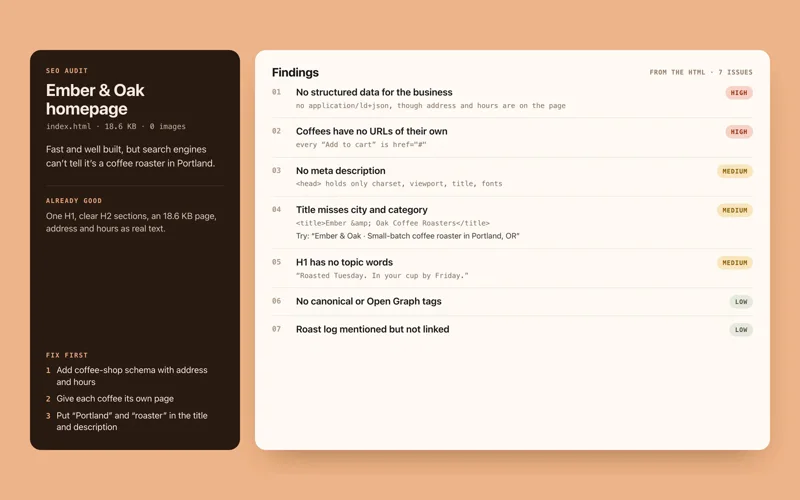
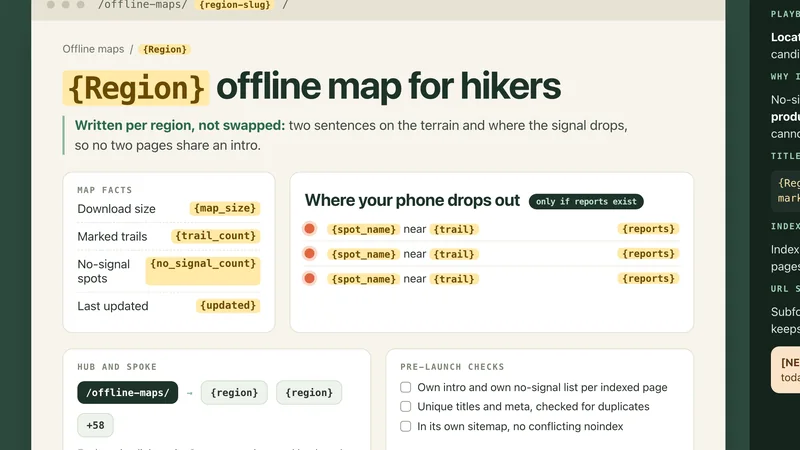
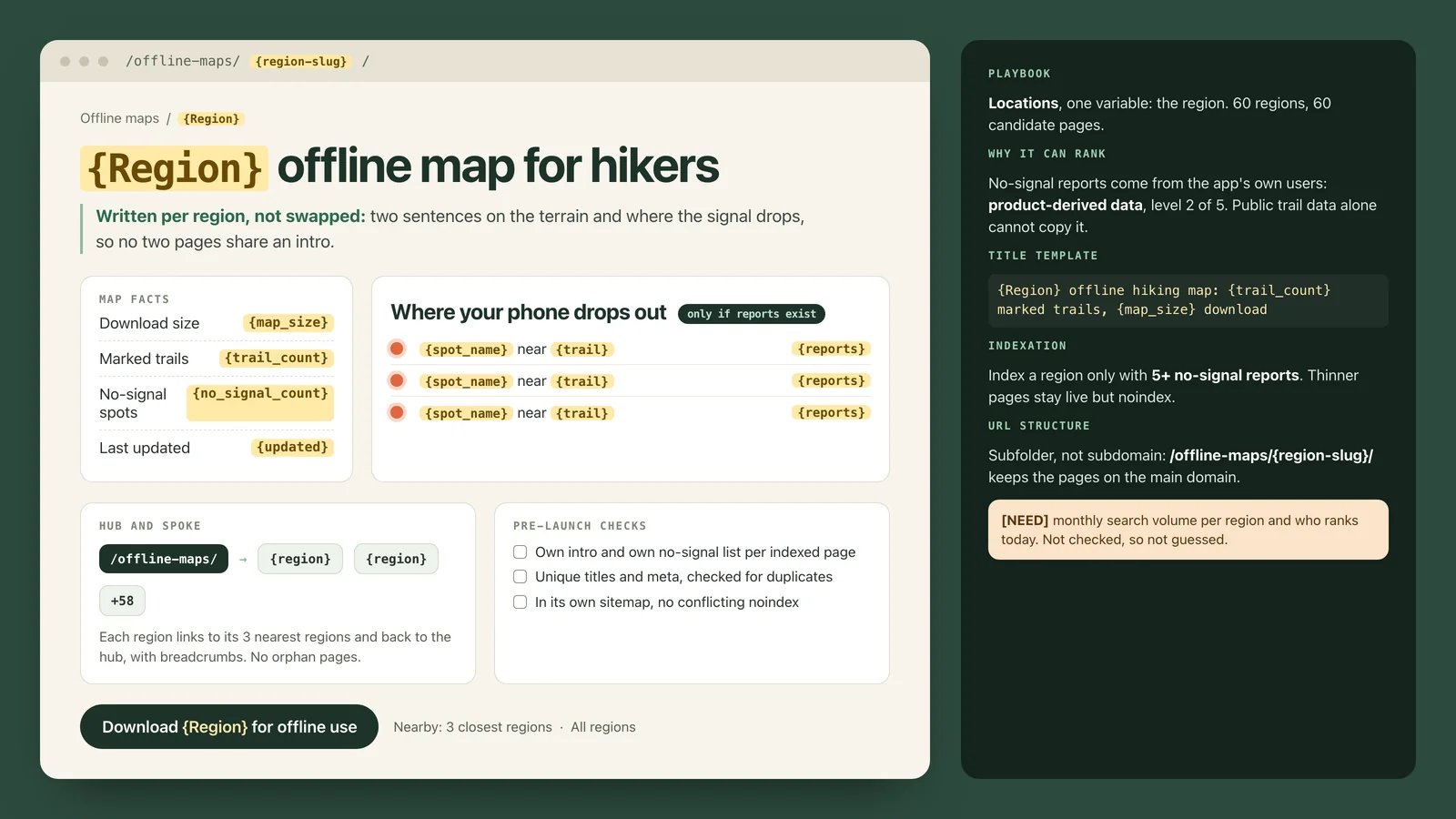
Programmatic SEO plan and page template for an offline trail map app. Pocket Atlas is an offline map app for hikers. For each of its 60 mapped trail regions it holds its own data: the download size of the offline map, the number of marked trails, and the spots where its users report no phone signal. Plan programmatic pages and draft the page template. Any brands, names or numbers inside are invented examples.
Example prompts
Type something like this once the skill is added. Your app opens the skill when the request matches.
-
Plan template pages for service plus city
-
Design a comparison page set for my product
-
Which data could make my directory pages unique?
-
Review my template pages for thin content
What’s inside
5 files in the skill folder, with its MIT licence kept inside. Only text instructions and reference files, no program files.
- SKILL.md the instructions
- evals/ 1 files
- references/ 2 files
- LICENSE licence
Which apps it works in
A skill is a folder of plain files, so any app that reads the open skills format can use it. Pick your app for its page.
How to add Programmatic SEO to your app
Step by step for each app. We say where to click, so you never need to leave this page.
ChatGPTby OpenAI
- 1 Download the skill (.zip) with the button at the top of this page, then unzip it.
- 2 Open the ChatGPT desktop app and look for Skills in the sidebar, where standalone skills are listed.
- 3 Add the “programmatic-seo” folder there if your version offers it. If you do not see Skills yet, use this skill in Claude or Codex instead.
- 4 In a chat, type @ and pick the skill, or just ask. Ask for what you want, for example: “Plan template pages for service plus city”
To make your own, describe the workflow to @skill-creator in ChatGPT Work and it drafts a skill for you.
Claude appby Anthropic
- 1 Download the skill (.zip) with the button at the top of this page.
- 2 In the Claude app, open Settings > Features.
- 3 Upload the .zip file.
- 4 Ask for what you want, for example: “Plan template pages for service plus city”
The current Claude Help Center lists Free, Pro, Max, Team and Enterprise. Organization policy can restrict uploads and sharing. Chat runs code in an isolated environment; uploading a skill does not give it your local project, coding-agent tools or unrestricted network access.
Codexby OpenAI
- 1 Download the skill (.zip) with the button at the top of this page, then unzip it.
- 2 Move the “programmatic-seo” folder into your skills folder:
~/.agents/skills - 3 Or paste the install prompt below into Codex and let it do the copying.
- 4 Start a new session. Ask for what you want, for example: “Plan template pages for service plus city”
Install prompt: paste this into Codex
I downloaded the agent skill "Programmatic SEO" as programmatic-seo.zip. Unzip it and copy the programmatic-seo folder into ~/.agents/skills. Before you finish, list every file it contains, show me any scripts and what they do, and stop if anything asks for passwords, API keys or downloads from other websites.
To use the skill in one project only, put it in .agents/skills inside that project instead.
Claude Codeby Anthropic
- 1 Download the skill (.zip) with the button at the top of this page, then unzip it.
- 2 Move the “programmatic-seo” folder into your skills folder:
~/.claude/skills - 3 Or paste the install prompt below into Claude Code and let it do the copying.
- 4 Start a new session. Ask for what you want, for example: “Plan template pages for service plus city”
Install prompt: paste this into Claude Code
I downloaded the agent skill "Programmatic SEO" as programmatic-seo.zip. Unzip it and copy the programmatic-seo folder into ~/.claude/skills. Before you finish, list every file it contains, show me any scripts and what they do, and stop if anything asks for passwords, API keys or downloads from other websites.
Built-in installer: claude plugin marketplace add <owner/repo>
Built-in installer: claude plugin install <plugin>@<marketplace>
To use the skill in one project only, put it in .claude/skills inside that project instead.
Cursor
- 1 Download the skill (.zip) with the button at the top of this page, then unzip it.
- 2 Move the “programmatic-seo” folder into your skills folder:
~/.cursor/skills - 3 Or paste the install prompt below into Cursor and let it do the copying.
- 4 Start a new session. Ask for what you want, for example: “Plan template pages for service plus city”
Install prompt: paste this into Cursor
I downloaded the agent skill "Programmatic SEO" as programmatic-seo.zip. Unzip it and copy the programmatic-seo folder into ~/.cursor/skills. Before you finish, list every file it contains, show me any scripts and what they do, and stop if anything asks for passwords, API keys or downloads from other websites.
To use the skill in one project only, put it in .cursor/skills inside that project instead. Cursor also reads ~/.agents/skills, ~/.claude/skills, ~/.codex/skills.
GitHub Copilotby GitHub
- 1 Download the skill (.zip) with the button at the top of this page, then unzip it.
- 2 Move the “programmatic-seo” folder into your skills folder:
~/.copilot/skills - 3 Or paste the install prompt below into GitHub Copilot and let it do the copying.
- 4 Start a new session. Ask for what you want, for example: “Plan template pages for service plus city”
Install prompt: paste this into GitHub Copilot
I downloaded the agent skill "Programmatic SEO" as programmatic-seo.zip. Unzip it and copy the programmatic-seo folder into ~/.copilot/skills. Before you finish, list every file it contains, show me any scripts and what they do, and stop if anything asks for passwords, API keys or downloads from other websites.
Built-in installer: gh skill install <owner/repo> <skill> --agent github-copilot --scope user
To use the skill in one project only, put it in .github/skills inside that project instead. GitHub Copilot also reads ~/.agents/skills.
Gemini CLIby Google
- 1 Download the skill (.zip) with the button at the top of this page, then unzip it.
- 2 Move the “programmatic-seo” folder into your skills folder:
~/.gemini/skills - 3 Or paste the install prompt below into Gemini CLI and let it do the copying.
- 4 Start a new session. Ask for what you want, for example: “Plan template pages for service plus city”
Install prompt: paste this into Gemini CLI
I downloaded the agent skill "Programmatic SEO" as programmatic-seo.zip. Unzip it and copy the programmatic-seo folder into ~/.gemini/skills. Before you finish, list every file it contains, show me any scripts and what they do, and stop if anything asks for passwords, API keys or downloads from other websites.
Built-in installer: gemini skills install <git-url>
To use the skill in one project only, put it in .gemini/skills inside that project instead. Gemini CLI also reads ~/.agents/skills.
Windsurf
- 1 Download the skill (.zip) with the button at the top of this page, then unzip it.
- 2 Move the “programmatic-seo” folder into your skills folder:
~/.codeium/windsurf/skills - 3 Or paste the install prompt below into Windsurf and let it do the copying.
- 4 Start a new session. Ask for what you want, for example: “Plan template pages for service plus city”
Install prompt: paste this into Windsurf
I downloaded the agent skill "Programmatic SEO" as programmatic-seo.zip. Unzip it and copy the programmatic-seo folder into ~/.codeium/windsurf/skills. Before you finish, list every file it contains, show me any scripts and what they do, and stop if anything asks for passwords, API keys or downloads from other websites.
To use the skill in one project only, put it in .windsurf/skills inside that project instead.
Kiro
- 1 Download the skill (.zip) with the button at the top of this page, then unzip it.
- 2 Move the “programmatic-seo” folder into your skills folder:
~/.kiro/skills - 3 Or paste the install prompt below into Kiro and let it do the copying.
- 4 Start a new session. Ask for what you want, for example: “Plan template pages for service plus city”
Install prompt: paste this into Kiro
I downloaded the agent skill "Programmatic SEO" as programmatic-seo.zip. Unzip it and copy the programmatic-seo folder into ~/.kiro/skills. Before you finish, list every file it contains, show me any scripts and what they do, and stop if anything asks for passwords, API keys or downloads from other websites.
To use the skill in one project only, put it in .kiro/skills inside that project instead.
Antigravityby Google
- 1 Download the skill (.zip) with the button at the top of this page, then unzip it.
- 2 Move the “programmatic-seo” folder into your skills folder:
~/.gemini/antigravity/skills - 3 Or paste the install prompt below into Antigravity and let it do the copying.
- 4 Start a new session. Ask for what you want, for example: “Plan template pages for service plus city”
Install prompt: paste this into Antigravity
I downloaded the agent skill "Programmatic SEO" as programmatic-seo.zip. Unzip it and copy the programmatic-seo folder into ~/.gemini/antigravity/skills. Before you finish, list every file it contains, show me any scripts and what they do, and stop if anything asks for passwords, API keys or downloads from other websites.
To use the skill in one project only, put it in .agents/skills inside that project instead.
OpenCode
- 1 Download the skill (.zip) with the button at the top of this page, then unzip it.
- 2 Move the “programmatic-seo” folder into your skills folder:
~/.config/opencode/skills - 3 Or paste the install prompt below into OpenCode and let it do the copying.
- 4 Start a new session. Ask for what you want, for example: “Plan template pages for service plus city”
Install prompt: paste this into OpenCode
I downloaded the agent skill "Programmatic SEO" as programmatic-seo.zip. Unzip it and copy the programmatic-seo folder into ~/.config/opencode/skills. Before you finish, list every file it contains, show me any scripts and what they do, and stop if anything asks for passwords, API keys or downloads from other websites.
To use the skill in one project only, put it in .opencode/skills inside that project instead. OpenCode also reads ~/.agents/skills, ~/.claude/skills.
Cline
- 1 Download the skill (.zip) with the button at the top of this page, then unzip it.
- 2 Move the “programmatic-seo” folder into your skills folder:
~/.agents/skills - 3 Or paste the install prompt below into Cline and let it do the copying.
- 4 Start a new session. Ask for what you want, for example: “Plan template pages for service plus city”
Install prompt: paste this into Cline
I downloaded the agent skill "Programmatic SEO" as programmatic-seo.zip. Unzip it and copy the programmatic-seo folder into ~/.agents/skills. Before you finish, list every file it contains, show me any scripts and what they do, and stop if anything asks for passwords, API keys or downloads from other websites.
To use the skill in one project only, put it in .agents/skills inside that project instead.
Amp
- 1 Download the skill (.zip) with the button at the top of this page, then unzip it.
- 2 Move the “programmatic-seo” folder into your skills folder:
~/.config/agents/skills - 3 Or paste the install prompt below into Amp and let it do the copying.
- 4 Start a new session. Ask for what you want, for example: “Plan template pages for service plus city”
Install prompt: paste this into Amp
I downloaded the agent skill "Programmatic SEO" as programmatic-seo.zip. Unzip it and copy the programmatic-seo folder into ~/.config/agents/skills. Before you finish, list every file it contains, show me any scripts and what they do, and stop if anything asks for passwords, API keys or downloads from other websites.
Built-in installer: amp skill add <github-url> --global
To use the skill in one project only, put it in .agents/skills inside that project instead. Amp also reads ~/.agents/skills, ~/.config/amp/skills, ~/.claude/skills.
Gooseby Block
- 1 Download the skill (.zip) with the button at the top of this page, then unzip it.
- 2 Move the “programmatic-seo” folder into your skills folder:
~/.agents/skills - 3 Or paste the install prompt below into Goose and let it do the copying.
- 4 Start a new session. Ask for what you want, for example: “Plan template pages for service plus city”
Install prompt: paste this into Goose
I downloaded the agent skill "Programmatic SEO" as programmatic-seo.zip. Unzip it and copy the programmatic-seo folder into ~/.agents/skills. Before you finish, list every file it contains, show me any scripts and what they do, and stop if anything asks for passwords, API keys or downloads from other websites.
To use the skill in one project only, put it in .agents/skills inside that project instead. Goose also reads ~/.claude/skills.
OpenClaw
- 1 Download the skill (.zip) with the button at the top of this page, then unzip it.
- 2 Move the “programmatic-seo” folder into your skills folder:
~/.openclaw/skills - 3 Or paste the install prompt below into OpenClaw and let it do the copying.
- 4 Start a new session. Ask for what you want, for example: “Plan template pages for service plus city”
Install prompt: paste this into OpenClaw
I downloaded the agent skill "Programmatic SEO" as programmatic-seo.zip. Unzip it and copy the programmatic-seo folder into ~/.openclaw/skills. Before you finish, list every file it contains, show me any scripts and what they do, and stop if anything asks for passwords, API keys or downloads from other websites.
Built-in installer: openclaw skills install @owner/<slug>
Built-in installer: openclaw skills install @owner/<slug> --global
Built-in installer: openclaw skills install git:owner/repo@ref
To use the skill in one project only, put it in skills inside that project instead. OpenClaw also reads ~/.agents/skills.
Hermes Agentby Nous Research
- 1 Download the skill (.zip) with the button at the top of this page, then unzip it.
- 2 Move the “programmatic-seo” folder into your skills folder:
~/.hermes/skills - 3 Or paste the install prompt below into Hermes Agent and let it do the copying.
- 4 Start a new session. Ask for what you want, for example: “Plan template pages for service plus city”
Install prompt: paste this into Hermes Agent
I downloaded the agent skill "Programmatic SEO" as programmatic-seo.zip. Unzip it and copy the programmatic-seo folder into ~/.hermes/skills. Before you finish, list every file it contains, show me any scripts and what they do, and stop if anything asks for passwords, API keys or downloads from other websites.
Built-in installer: hermes skills install <owner/repo/skill>
VS Codeby Microsoft
- 1 Download the skill (.zip) with the button at the top of this page, then unzip it.
- 2 Move the “programmatic-seo” folder into your skills folder:
~/.copilot/skills - 3 Or paste the install prompt below into VS Code and let it do the copying.
- 4 Start a new session. Ask for what you want, for example: “Plan template pages for service plus city”
Install prompt: paste this into VS Code
I downloaded the agent skill "Programmatic SEO" as programmatic-seo.zip. Unzip it and copy the programmatic-seo folder into ~/.copilot/skills. Before you finish, list every file it contains, show me any scripts and what they do, and stop if anything asks for passwords, API keys or downloads from other websites.
To use the skill in one project only, put it in .github/skills inside that project instead. VS Code also reads ~/.claude/skills, ~/.agents/skills.
Questions about Programmatic SEO
Is this automatic page spam?
No. The skill is built around avoiding thin content and giving each page unique value.
Does it read my product notes?
It checks for a product marketing context file first and only asks what is missing.
Is the Programmatic SEO skill free?
It is a Premium skill on Best Agent Skills. Premium opens soon, with monthly, yearly and lifetime plans on the pricing page.
Who made the Programmatic SEO skill?
Corey Haines. We did not write it. Best Agent Skills curates skills like this one, explains them in plain words and shows how to add them to your app. It is shared under the MIT licence (Copyright (c) 2025 Corey Haines).